
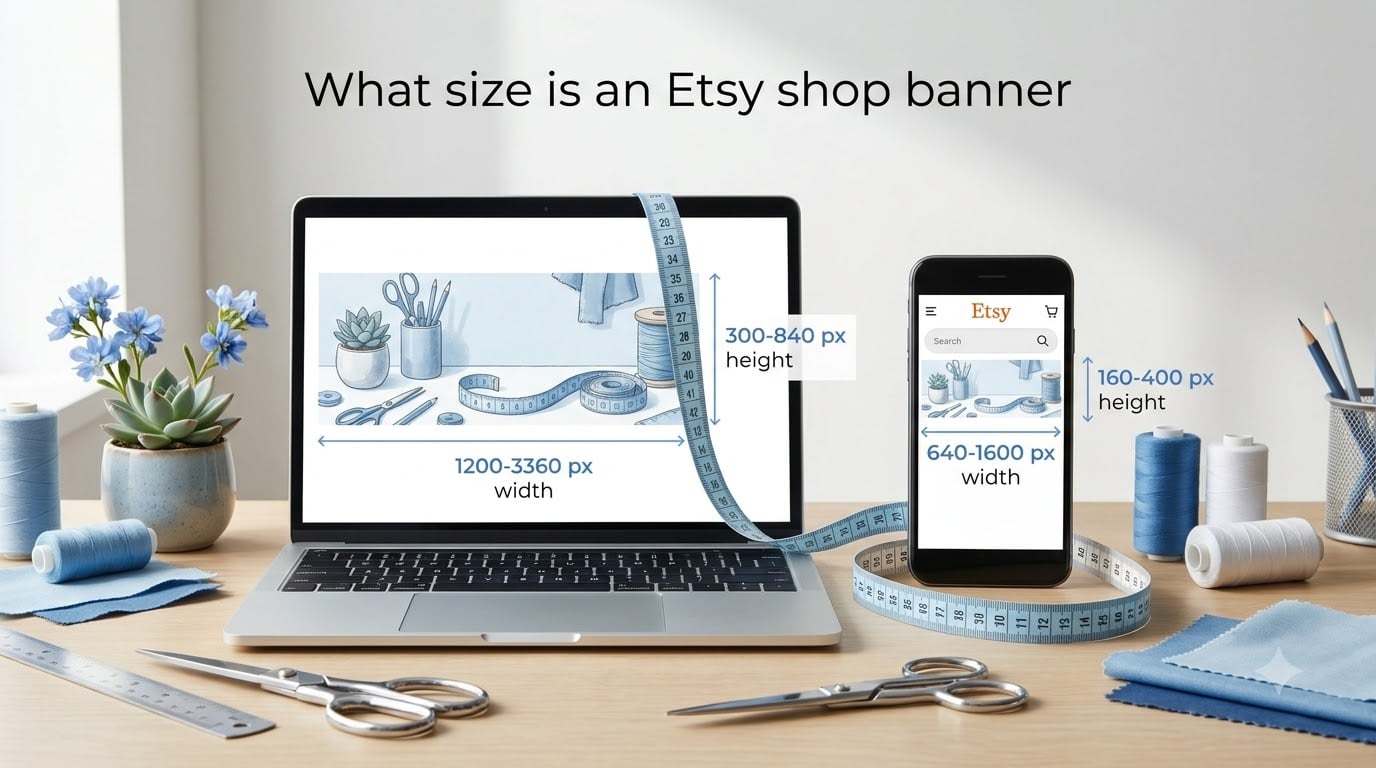
If you are wondering what size is an Etsy shop banner, the quick answer is that Etsy supports several formats: the big banner at a recommended 1600 x 400 pixels (minimum 1200 x 300), the mini banner at a recommended 1600 x 213 pixels (minimum 1200 x 160), and the cover photo at 3360 x 840 pixels for the sharpest possible display across all devices.
Your shop banner is the first thing a potential buyer sees when they land on your Etsy storefront. Getting the dimensions right means your branding looks professional, your text stays readable, and your images do not get cropped awkwardly on mobile phones.
In this guide, our team breaks down every Etsy banner size you need to know for 2026, including the big banner, mini banner, cover photo, carousel, and collage formats. We also cover safe areas, file formats, troubleshooting blurry uploads, and design tips drawn from real Etsy sellers on Reddit and beyond.
Table of Contents
- Etsy Shop Banner Size at a Glance
- Etsy Big Banner Size and Specifications
- Etsy Mini Banner Size and Specifications
- Etsy Cover Photo Size (Recommended for All Shops)
- Etsy Plus Carousel and Collage Banner Sizes
- Etsy Shop Icon and Profile Photo Sizes
- Etsy Banner Safe Area Guidelines for Mobile and Desktop
- File Formats and Upload Requirements
- Etsy Banner Size in Inches and Centimeters
- How to Upload an Etsy Shop Banner Step by Step
- Why Does My Etsy Banner Look Blurry? Troubleshooting Guide
- Design Tips for a High-Quality Etsy Shop Banner
- Common Etsy Banner Mistakes to Avoid
- FAQs
- Conclusion
Etsy Shop Banner Size at a Glance
Here is a quick-reference list of every Etsy shop banner size so you can find the right dimensions without scrolling through the whole article.
Big Banner (Standard): Minimum 1200 x 300 pixels, recommended 1600 x 400 pixels, aspect ratio 4:1
Mini Banner (Small): Minimum 1200 x 160 pixels, recommended 1600 x 213 pixels, aspect ratio 7.5:1
Cover Photo (Recommended): 3360 x 840 pixels, aspect ratio 4:1
Carousel Banner (Etsy Plus): Minimum 1200 x 300 pixels per slide, recommended 1600 x 400 pixels
Collage Banner (Etsy Plus): Minimum 1200 x 300 pixels, recommended 1600 x 400 pixels
Shop Icon: 500 x 500 pixels, square format
Profile Photo: 400 x 400 pixels, square format
For most shops in 2026, the cover photo at 3360 x 840 pixels gives you the best results because it stays crisp on retina displays and high-resolution phone screens. If you are using a free Etsy shop without the Plus subscription, the big banner or mini banner are your two options.
Etsy Big Banner Size and Specifications
The Etsy big banner is the standard full-width header image that appears at the top of your shop page. Etsy requires a minimum size of 1200 x 300 pixels, but the recommended design size is 1600 x 400 pixels for a sharper appearance.
The aspect ratio for the big banner is 4:1, meaning the image is four times as wide as it is tall. This wide, short format works well for landscape photography, product collages, and text-based branding headers.
Use the big banner when you want maximum visual impact on your storefront without needing a subscription. It displays prominently on both desktop and mobile, though some cropping happens on smaller screens.
One common mistake we see is designing at the 1200 x 300 minimum and expecting it to look sharp on modern screens. That size works, but it can look slightly soft on high-DPI displays. Designing at 1600 x 400 gives you a noticeable quality boost for very little extra effort.
Etsy Mini Banner Size and Specifications
The Etsy mini banner is a slim, low-profile header that takes up less vertical space than the big banner. Etsy requires a minimum of 1200 x 160 pixels, with a recommended design size of 1600 x 213 pixels.
This banner has an aspect ratio of roughly 7.5:1, making it much wider and shorter than the big banner. The mini banner is ideal when you want a clean, minimal header that pushes shoppers toward your listings faster.
Many Etsy sellers on Reddit report that mini banners uploaded at the 1200 x 160 minimum appear blurry after compression. The fix is simple: design at 1600 x 213 pixels instead. This gives Etsy enough pixel data to compress without degrading text or thin design elements.
Choose the mini banner if your shop has a product-forward layout and you do not want a large header competing with your listing thumbnails. It is also a solid option if your branding relies on a simple logo bar rather than a rich lifestyle image.
Etsy Cover Photo Size (Recommended for All Shops)
The Etsy cover photo measures 3360 x 840 pixels and is the recommended banner format for all shops that want the best possible display quality. It shares the same 4:1 aspect ratio as the big banner but contains far more pixels.
This higher resolution matters because over 50% of Etsy traffic comes from mobile devices with high-density screens. A cover photo at 3360 pixels wide stays razor-sharp on retina displays, modern phones, and large desktop monitors alike.
When you upload a cover photo, Etsy treats it as your primary header and replaces the big banner slot with this larger image. The extra resolution also gives you more flexibility for safe zones, text placement, and edge padding.
Our team recommends the cover photo size for any seller serious about branding. The only downside is the larger file size, so you need to optimize your export settings to stay under the 1MB upload limit.
Etsy Plus Carousel and Collage Banner Sizes
Etsy Plus subscribers get access to two additional banner formats beyond the standard big and mini banners: the carousel banner and the collage banner. Both require an active Etsy Plus subscription.
The carousel banner lets you display multiple rotating images at the top of your shop. Each slide should be at least 1200 x 300 pixels, with a recommended size of 1600 x 400 pixels per slide. You can add up to five slides, and each one can showcase a different product collection, seasonal promotion, or brand story.
The collage banner combines several smaller images into a single grid-style header. The overall size is the same as the big banner: minimum 1200 x 300 pixels, recommended 1600 x 400 pixels. Within that space, Etsy arranges your selected listing photos into a pre-formatted collage layout.
Both formats are useful for sellers who want a dynamic or multi-product header without manually designing a composite image. The carousel works particularly well for seasonal campaigns, since you can swap individual slides without redesigning the whole banner.
Etsy Shop Icon and Profile Photo Sizes
Your Etsy shop icon and profile photo work alongside your banner to create a cohesive brand identity. Getting these sizes right ensures your branding looks consistent across every surface where your shop appears.
The shop icon should be 500 x 500 pixels in a square format. This icon appears next to your shop name on your storefront, in search results, and on individual listing pages. Think of it as your logo or brand mark.
The profile photo should be 400 x 400 pixels, also square. This image appears on your public profile page and in conversations with buyers. Many sellers use the same image for both the shop icon and profile photo to keep branding unified.
Consistency across your banner, shop icon, and profile photo builds trust with shoppers. When all three elements share the same color palette, fonts, and visual style, your shop looks polished and professional.
Etsy Banner Safe Area Guidelines for Mobile and Desktop
The safe area is the central portion of your banner where important content like text, logos, and key images will not get cropped regardless of screen size. Understanding safe areas is the single most important thing you can do to prevent mobile display problems.
On desktop, your banner displays at its full width. On mobile devices, Etsy crops the left and right edges of the image to fit narrower screens. This means anything placed near the far left or far right edges of your design may disappear entirely on phones.
Here is how to use the safe area effectively. Keep all text, logos, and critical images within the center 60% of your banner width. Leave the outer 20% on each side as decorative space or background-only area that can be cropped without losing meaning.
For vertical safety, Etsy crops the top and bottom of banners on some mobile layouts. Keep important elements vertically centered, avoiding the extreme top and bottom 10% of your design.
Reddit sellers frequently report text getting cut off on mobile, which almost always traces back to placing content outside the safe area. Designing with a safe zone in mind from the start eliminates this problem entirely.
File Formats and Upload Requirements
Etsy accepts three file formats for shop banners: JPG, PNG, and GIF. Each format has strengths depending on your banner content.
JPG works best for photographic banners with gradients, textures, and many colors. It produces smaller file sizes, which helps you stay under the 1MB upload limit.
PNG is the better choice for text-heavy banners, graphic designs, and images with sharp edges or large areas of solid color. Reddit sellers consistently report that PNG keeps text crisper after Etsy compression compared to JPG.
GIF supports simple animations, though Etsy reduces animated GIFs to static images in most display contexts. Most sellers skip GIF for banners.
Beyond format, follow these export settings for the cleanest results:
Use the sRGB color profile to ensure accurate colors across all devices
Set resolution to 72 DPI, which is the web standard
Keep file size under 1MB to avoid upload failures, especially on slower connections
Avoid progressive JPGs, which can cause rendering issues in some browsers
File upload failures are one of the most common complaints on the r/EtsySellers subreddit, and oversized files are almost always the cause. If your upload fails, check your file size first.
Etsy Banner Size in Inches and Centimeters
Print designers and illustrators often think in physical units rather than pixels. Here are the Etsy banner dimensions converted to inches and centimeters at 72 DPI, the standard web resolution.
Big Banner (1600 x 400 px): 22.2 x 5.6 inches or 56.4 x 14.1 cm
Mini Banner (1600 x 213 px): 22.2 x 3.0 inches or 56.4 x 7.5 cm
Cover Photo (3360 x 840 px): 46.7 x 11.7 inches or 118.5 x 29.6 cm
Shop Icon (500 x 500 px): 6.9 x 6.9 inches or 17.6 x 17.6 cm
These conversions are useful if you are designing your banner in print-oriented software like Adobe Illustrator or Affinity Designer, where you might start with a physical artboard and export to pixels.
Remember that Etsy displays banners on screens, not in print. The physical dimensions are just a reference for your design workflow. Always export your final file at the correct pixel dimensions listed earlier in this guide.
How to Upload an Etsy Shop Banner Step by Step
Uploading or changing your Etsy shop banner takes less than two minutes once you have your image file ready. Here is the exact process.
Step 1: Log in to your Etsy account and go to Shop Manager.
Step 2: Click on the pencil icon or “Edit” button on your shop homepage banner area. On newer Etsy layouts, this appears as a camera icon overlay on your current banner.
Step 3: Select the banner type you want to upload. You will see options for the big banner, mini banner, or cover photo depending on your shop setup.
Step 4: Click “Upload” and select your banner file from your computer. Make sure the file is in JPG or PNG format and under 1MB.
Step 5: Wait for the upload to complete, then preview how the banner looks on both desktop and mobile views if the option is available.
Step 6: Click “Save” or “Publish” to make your new banner live.
To add a carousel banner with Etsy Plus, follow the same steps but select the carousel option. You can then upload multiple images and reorder them by dragging.
To add a collage banner with Etsy Plus, select the collage option and choose which listing photos you want Etsy to arrange into the grid layout automatically.
Why Does My Etsy Banner Look Blurry? Troubleshooting Guide
Blurry banners are the number one complaint among Etsy sellers, and the issue almost always comes down to one of five causes. Here is how to diagnose and fix each one.
Cause 1: Designing at minimum dimensions. If you design your big banner at 1200 x 300 pixels, Etsy has no room to compress without losing quality. Fix: redesign at 1600 x 400 pixels, or better yet, use the 3360 x 840 cover photo size.
Cause 2: Wrong file format. Text and graphics saved as JPG develop compression artifacts around sharp edges. Fix: export text-heavy banners as PNG instead.
Cause 3: Upscaling a small image. If your original design is smaller than the required dimensions, stretching it to fit creates blur. Fix: always design at or above the recommended pixel dimensions from the start.
Cause 4: Etsy compression. Etsy applies its own compression to every uploaded image, which can make tiny details and thin fonts look fuzzy. Fix: use bold, high-contrast fonts and avoid intricate patterns in small areas.
Cause 5: Incorrect color profile. Files saved in CMYK or non-standard color profiles can render incorrectly. Fix: always save in sRGB color mode.
Reddit users on r/EtsySellers report that switching from the 1200 x 160 mini banner to the 1600 x 213 recommended size eliminates blur in nearly every case. The same principle applies to the big banner: more pixels means more headroom for clean compression.
Design Tips for a High-Quality Etsy Shop Banner
A correctly sized banner is just the starting point. Good design is what turns dimensions into a compelling shop header that converts visitors into buyers.
Typography: Use bold, legible fonts with high contrast against the background. Avoid thin, delicate typefaces because Etsy compression softens fine details. Keep your shop name or tagline in the safe area center zone.
Color and whitespace: Give your design room to breathe. Whitespace around text and logos makes your banner look intentional and premium. Use a color palette that matches your shop icon and listing thumbnails for brand consistency.
Image selection: Lifestyle photos outperform plain product shots in banner headers. Choose an image that tells a story about your brand, whether that is a styled product flat-lay, a behind-the-scenes workshop shot, or a seasonal scene.
Mobile-first thinking: Since over half of Etsy shoppers browse on phones, design your banner for the mobile view first. Test how it looks on a narrow screen before finalizing. If text is unreadable on a phone, simplify the design.
Design tools: Several free and paid tools make banner creation accessible even without design experience:
Canva: Set a custom size of 3360 x 840 pixels for the cover photo, or 1600 x 400 for the big banner. Canva has built-in Etsy templates, but always verify the template dimensions match current requirements before starting
Adobe Express: Offers free Etsy banner templates with proper dimensions
PicMonkey and BeFunky: Browser-based editors with banner templates
Fotor: Includes design tools specifically for e-commerce headers
Adobe Photoshop or Illustrator: Best for professional designers who want full control over every pixel
For the Canva users asking about Etsy banner size, the answer is the same: create a custom design at 3360 x 840 pixels for the cover photo or 1600 x 400 pixels for the big banner. Do not rely on older Canva templates that may use outdated dimensions.
Common Etsy Banner Mistakes to Avoid
Even experienced sellers make these banner mistakes. Use this checklist to audit your current shop header.
Placing text near edges: Content outside the safe area gets cropped on mobile. Keep critical elements centered.
Using the wrong file format: JPG for text-heavy banners causes blur. Use PNG for graphics and JPG for photos.
Ignoring mobile display: Always preview your banner on a phone screen before publishing.
Designing at minimum dimensions: Always use recommended sizes, not minimums, for sharper results.
Exceeding the file size limit: Files over 1MB fail to upload. Optimize before exporting.
Using the wrong color profile: Save in sRGB, never CMYK, for web display.
Inconsistent branding: Your banner, shop icon, and listings should share a visual language.
Overcrowding the design: Too many elements make banners look cluttered and unprofessional.
Forgetting seasonal updates: Stale holiday banners signal an inactive shop. Swap banners for holidays and promotions.
Neglecting A/B testing: Try different banner designs and track views, favorites, and conversion rates to see what resonates.
FAQs
What is the right size for an Etsy shop banner?
The recommended size for an Etsy shop banner depends on the type. For the big banner, design at 1600 x 400 pixels (minimum 1200 x 300). For the mini banner, use 1600 x 213 pixels (minimum 1200 x 160). For the best quality across all devices, use the cover photo size at 3360 x 840 pixels.
What size is the banner on Etsy shop in Canva?
In Canva, create a custom design at 3360 x 840 pixels for the cover photo, 1600 x 400 pixels for the big banner, or 1600 x 213 pixels for the mini banner. Always verify the dimensions rather than relying on older Canva templates, which may use outdated sizes.
Why does my Etsy banner look blurry?
Your banner likely looks blurry because it was designed at the minimum dimensions, saved in the wrong file format, upscaled from a smaller image, or uploaded in a non-sRGB color profile. Design at recommended sizes (not minimums), use PNG for text-heavy banners, use JPG for photos, and always export in sRGB at 72 DPI.
What size is the Etsy banner small?
The Etsy mini banner (small banner) has a minimum size of 1200 x 160 pixels and a recommended design size of 1600 x 213 pixels. Its aspect ratio is approximately 7.5:1, making it much shorter than the big banner.
Conclusion
Knowing what size is an Etsy shop banner is the foundation of a professional storefront. Design your big banner at 1600 x 400 pixels, your mini banner at 1600 x 213 pixels, and your cover photo at 3360 x 840 pixels for the sharpest results on every device.
Keep critical content inside the safe area, export in sRGB at the correct file format, and always preview your banner on mobile before publishing. These steps take minutes but make the difference between a shop that looks amateur and one that converts browsers into buyers.
Your banner is your digital storefront sign. Treat it with the same care you would give a physical shop window, and it will pay dividends in traffic, trust, and sales.