
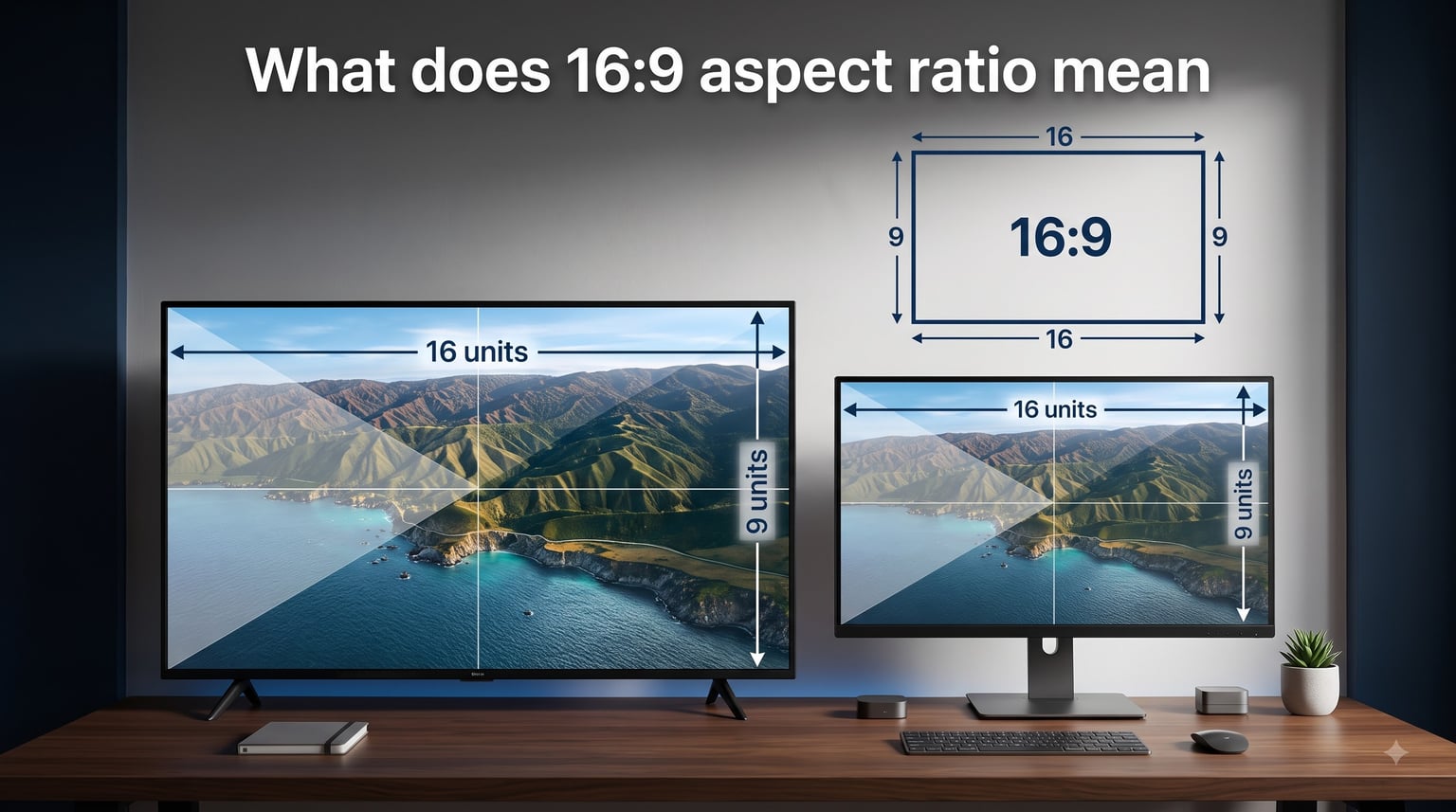
Every time you watch a YouTube video, fire up Netflix on your TV, or open a game on your monitor, you are looking at the 16:9 aspect ratio in action. It is the shape that defines modern screens. But what does 16:9 aspect ratio mean, exactly?
In simple terms, 16:9 means a screen or image is 16 units wide for every 9 units tall. This proportional relationship, equal to about 1.77:1, has been the worldwide standard for high-definition television, computer monitors, laptops, and streaming platforms since the late 1990s.
If you have ever wondered why your screen looks the way it does, or why black bars appear on some videos, understanding aspect ratios clears up a lot of the confusion. Let me break down what 16:9 means, how it works, and why it became the universal standard.
Table of Contents
What Does 16:9 Aspect Ratio Mean? The Simple Definition
The 16:9 aspect ratio describes a display or image that is 16 units wide for every 9 units tall. Think of it as a rectangle where the width is roughly 1.77 times the height. Divide 16 by 9 and you get 1.777…, which is why you will sometimes see this ratio written as 1.77:1 or 1.78:1.
The important thing to understand is that units can be anything. Pixels, inches, centimeters, or millimeters all work because the ratio only describes the proportional relationship between width and height. A 16:9 image that is 16 inches wide would be 9 inches tall. That same ratio applied at a larger scale means a screen 32 inches wide would stand 18 inches tall.
Compare this to the old 4:3 standard (the boxy shape of CRT televisions), where the width was only 1.33 times the height. The 16:9 widescreen format is about 33% wider relative to its height than the old 4:3 format. This extra width makes it much better suited for cinematic content and side-by-side multitasking.
When someone says a video is shot in “16 by 9” or “16×9,” they mean the frame follows this exact proportional shape. Any resolution that maintains the 16:9 relationship, whether it is 1280×720 or 3840×2160, shares this same aspect ratio.
How 16:9 Became the Universal Standard
The story of 16:9 begins in the early 1980s, when the film and television industries were wrestling with a growing problem. Movies were shot in wide cinematic formats like 2.35:1 and 2.39:1, while home TVs used the narrow 4:3 format. This mismatch meant either letterboxing (black bars above and below the image) or pan-and-scan (cropping the sides off the movie).
In 1984, Dr. Kerns H. Powers, a member of the SMPTE (Society of Motion Picture and Television Engineers) Working Group on High-Definition Electronic Production, proposed a solution. He calculated the geometric mean of the extreme aspect ratios in use at the time, from the old 4:3 (1.33:1) television format to the widest common cinema format (2.35:1). The geometric mean of 1.33 and 2.35 turned out to be approximately 1.77, which is 16:9.
This made 16:9 a mathematical compromise. It was not too wide for standard television content and not too narrow for movies. No matter what format a piece of content was originally shot in, displaying it on a 16:9 screen would result in relatively minimal wasted screen space compared to any other ratio.
The format gained serious traction in Europe through the EU 16:9 Action Plan, a initiative in the early 1990s that subsidized broadcasters who adopted widescreen programming. Japan also pushed the format through its Hi-Vision (MUSE) HDTV system. By 2009, when the United States completed its transition from analog to digital television broadcasting, 16:9 was firmly established as the global standard.
Computer monitor manufacturers followed suit. By the late 2000s, most desktop monitors and laptop screens had switched from 4:3 and 16:10 formats to 16:9. Today, according to hardware surveys from major gaming platforms, over 85% of PC gamers use a 16:9 display. The format is everywhere.
Common 16:9 Resolutions in Pixels
A common source of confusion is the relationship between aspect ratio and resolution. The 16:9 aspect ratio describes a shape, while resolution describes how many pixels fill that shape. You can have many different resolutions that all share the 16:9 aspect ratio.
Here are the most common 16:9 resolutions you will encounter, from smallest to largest:
640 x 360 (nHD): 230,400 pixels. Used for low-bandwidth streaming and thumbnails.
854 x 480 (FWVGA): 409,920 pixels. Standard definition widescreen, common on older mobile devices.
1280 x 720 (HD / 720p): 921,600 pixels. The entry point for high-definition video and broadcasts.
1920 x 1080 (Full HD / 1080p): 2,073,600 pixels. The most widely used HD resolution for monitors, TVs, and YouTube content.
2560 x 1440 (QHD / 1440p): 3,686,400 pixels. Popular among gamers and creative professionals who want more screen real estate without jumping to 4K.
3840 x 2160 (4K UHD / 2160p): 8,294,400 pixels. The standard for ultra-high-definition content on modern TVs and streaming.
7680 x 4320 (8K UHD / 4320p): 33,177,600 pixels. The bleeding edge of consumer display technology, available on premium TVs.
Notice how every single resolution on this list divides evenly into a 16:9 proportion. Take 1920 divided by 1080: you get 1.777, the same ratio as 16 divided by 9. That mathematical consistency is what makes all of these resolutions compatible with the same screens and video players.
This is also why 1920×1080 and 16:9 are not the same thing. 1920×1080 is one specific resolution that happens to use the 16:9 aspect ratio. You could downscale that video to 1280×720 or upscale it to 3840×2160 and it would still be 16:9. The shape stays the same, but the pixel count changes.
Where 16:9 Is Used Today
The 16:9 aspect ratio is the default format for almost every type of digital screen content you interact with daily. Here is where you will find it in action.
Television and Streaming: Every HDTV, 4K TV, and 8K TV on the market uses a 16:9 panel. Netflix, Amazon Prime Video, Disney+, Hulu, and YouTube all encode their primary video streams in 16:9. Broadcast television in the United States, Europe, and most of Asia transmits in 16:9. Even most Blu-ray discs are mastered in this format.
Computer Monitors and Laptops: The vast majority of desktop monitors sold today are 16:9, with 1920×1080 being the most common resolution. Most laptops, from budget Chromebooks to high-end ultrabooks, also feature 16:9 displays. A few productivity-focused laptops have shifted to 16:10 or 3:2 in recent years, but 16:9 still dominates the market.
Gaming: Both major game consoles (PlayStation and Xbox) output natively in 16:9. PC games are designed around 16:9 as the primary target, with wider formats like 21:9 often supported but not always optimized. Competitive gaming tournaments run exclusively on 16:9 monitors.
Smartphones and Tablets: While phones are held vertically (and often use 9:16 for the portrait orientation), most smartphone cameras shoot video in 16:9 landscape mode. When you rotate your phone to watch a video, the display switches to 16:9 for a full-screen viewing experience.
Online Video and Social Media: YouTube’s default player is 16:9. Vimeo, Twitch, and most web-based video players use this ratio. Even social media platforms that support vertical video (like TikTok and Instagram Reels using 9:16) default to 16:9 for their standard horizontal video format.
16:9 vs Other Aspect Ratios: How It Compares
Understanding 16:9 is easier when you compare it to the other aspect ratios you might encounter. Each format has its own strengths and ideal use cases.
16:9 vs 4:3: The 4:3 aspect ratio (1.33:1) was the standard for television and early computer monitors for decades. It is noticeably taller and boxier than 16:9. When you watch old TV shows on a modern 16:9 screen, you see black bars on the left and right sides of the image. This is called pillarboxing. Conversely, old 4:3 TVs displayed widescreen movies with black bars on top and bottom, called letterboxing.
16:9 vs 21:9 (Ultrawide): The 21:9 aspect ratio (roughly 3.5:1) is significantly wider than 16:9. It is popular for premium gaming monitors and cinema-style home theaters. Ultrawide monitors give you more horizontal screen space for gaming and productivity, but not all games and applications support the format natively. When ultrawide content plays on a 16:9 screen, you get letterboxing bars on top and bottom.
16:9 vs 16:10: The 16:10 ratio (1.6:1) is slightly taller than 16:9. It was common on older laptops and is making a comeback on some premium productivity machines like MacBooks. The extra vertical space is useful for reading documents and writing code, but the difference from 16:9 is subtle enough that most people do not notice it.
16:9 vs Cinematic Formats (2.35:1 and 2.39:1): Many blockbuster films are shot in ultra-wide cinematic formats wider than 16:9. When you watch these movies on a 16:9 TV, you see letterbox bars above and below the picture. Some home theater enthusiasts invest in 2.35:1 projector screens to eliminate these bars for a true cinema experience.
The reason 16:9 won out over all these alternatives is its versatility. It sits in the middle of the spectrum, narrow enough to display older 4:3 content without too much wasted space, and wide enough that cinematic content does not lose too much of its impact. No other single ratio handles as wide a variety of content formats as gracefully.
Gaming on 16:9: What You Need to Know
If you spend time in gaming communities, you will notice that aspect ratio is a frequent topic of debate. Competitive gamers in particular have strong opinions about which ratio gives the best experience.
The short answer is that 16:9 is the default and recommended aspect ratio for virtually all competitive gaming. Games like Counter-Strike 2, Valorant, and League of Legends are balanced around a 16:9 field of view. Playing on a stretched 4:3 resolution (a practice carried over from older CS versions) can make character models appear wider, but it also reduces your horizontal field of view, meaning you see less of the game world on the sides of your screen.
Ultrawide monitors (21:9) offer an immersive experience for single-player and simulation games, giving you peripheral vision that can be a genuine advantage in racing or flight sims. However, some competitive games intentionally cap the field of view regardless of your monitor width to keep things fair. If you play competitively, 16:9 ensures you are seeing exactly what the developers intended.
Console gaming is entirely built around 16:9. PlayStation and Xbox games are developed and tested on 16:9 displays, and all current-generation consoles output natively in this format. You will never run into compatibility issues or stretched images with a standard 16:9 television or monitor.
How to Change or Set 16:9 Aspect Ratio
Whether you are editing a photo, exporting a video, or adjusting your monitor, setting the correct 16:9 aspect ratio is straightforward once you know where to look. Here is how to do it across common tools and devices.
In Photoshop: Open the Crop Tool from the toolbar or press C on your keyboard. In the options bar at the top, set the aspect ratio dropdown to “16:9” or enter 16 in the width field and 9 in the height field. Drag the crop handles to position your image, then press Enter to apply.
In Adobe Premiere Pro: Go to File, then New Sequence. In the Settings tab, set the Frame Size horizontal to 1920 and vertical to 1080 (or any other 16:9 resolution). The aspect ratio automatically follows from the pixel dimensions you choose.
In DaVinci Resolve: Navigate to Project Settings (the gear icon in the bottom right). Under Image Scaling, set the Output sizing to match your desired 16:9 resolution, such as 3840×2160 for 4K or 1920×1080 for Full HD.
On Windows: Right-click on your desktop and select Display Settings. Under Display Resolution, choose a 16:9 option such as 1920×1080 or 2560×1440. Windows will automatically apply the correct aspect ratio.
On Mac: Open System Settings, then Displays. Select your display and choose a 16:9 resolution from the available options. Macs with Retina displays typically default to a 16:9 resolution already.
On a Smartphone Camera: Most phone camera apps default to 4:3 for photos. Look for the aspect ratio icon (usually in the viewfinder or settings menu) and switch it to 16:9. This is ideal if you plan to share the image on YouTube or display it on a widescreen monitor.
FAQs
Is 16:9 a good aspect ratio?
Yes, 16:9 is an excellent aspect ratio for most uses. It is the universal standard for TVs, monitors, streaming platforms, and gaming because it provides a wide field of view while remaining tall enough for reading and productivity. Its biggest advantage is compatibility, since nearly all modern digital content is produced in 16:9.
Is 16:9 ratio the same as 1920×1080?
No, but 1920×1080 uses the 16:9 aspect ratio. The difference is that 16:9 describes the shape (16 units wide for every 9 units tall), while 1920×1080 is a specific resolution that fills that shape with pixels. Other resolutions like 1280×720 and 3840×2160 also use the 16:9 aspect ratio.
How do I make a photo 16:9 aspect ratio?
Open your image in any photo editor with a crop tool (Photoshop, GIMP, or even built-in phone editors). Select the crop tool, set the aspect ratio to 16:9, position the crop over your image, and apply. The resulting image will have the widescreen 16:9 proportions.
Is 16:9 the same as 4K?
No, 16:9 and 4K are different concepts. 16:9 is an aspect ratio that describes the shape of the screen, while 4K (3840×2160) is a resolution that describes the number of pixels. 4K displays do use the 16:9 aspect ratio, but so do 720p, 1080p, and 1440p displays. You can have 4K in 16:9, but 16:9 is not automatically 4K.
Conclusion
So, what does 16:9 aspect ratio mean? It is a widescreen format where the width measures 16 units for every 9 units of height, creating a 1.77:1 proportional rectangle. Born from a mathematical compromise in 1984, it has become the universal standard for television, computer monitors, streaming platforms, and gaming.
Understanding 16:9 helps you make sense of resolutions, black bars, and the way content appears across different screens. Whether you are cropping a photo for YouTube, choosing a new monitor, or just wondering why your favorite old TV show has black bars on the sides, the 16:9 aspect ratio is the key that ties it all together.
The next time you look at any modern screen, you will know exactly why it has that particular shape and how it came to define the way we watch, play, and create.