
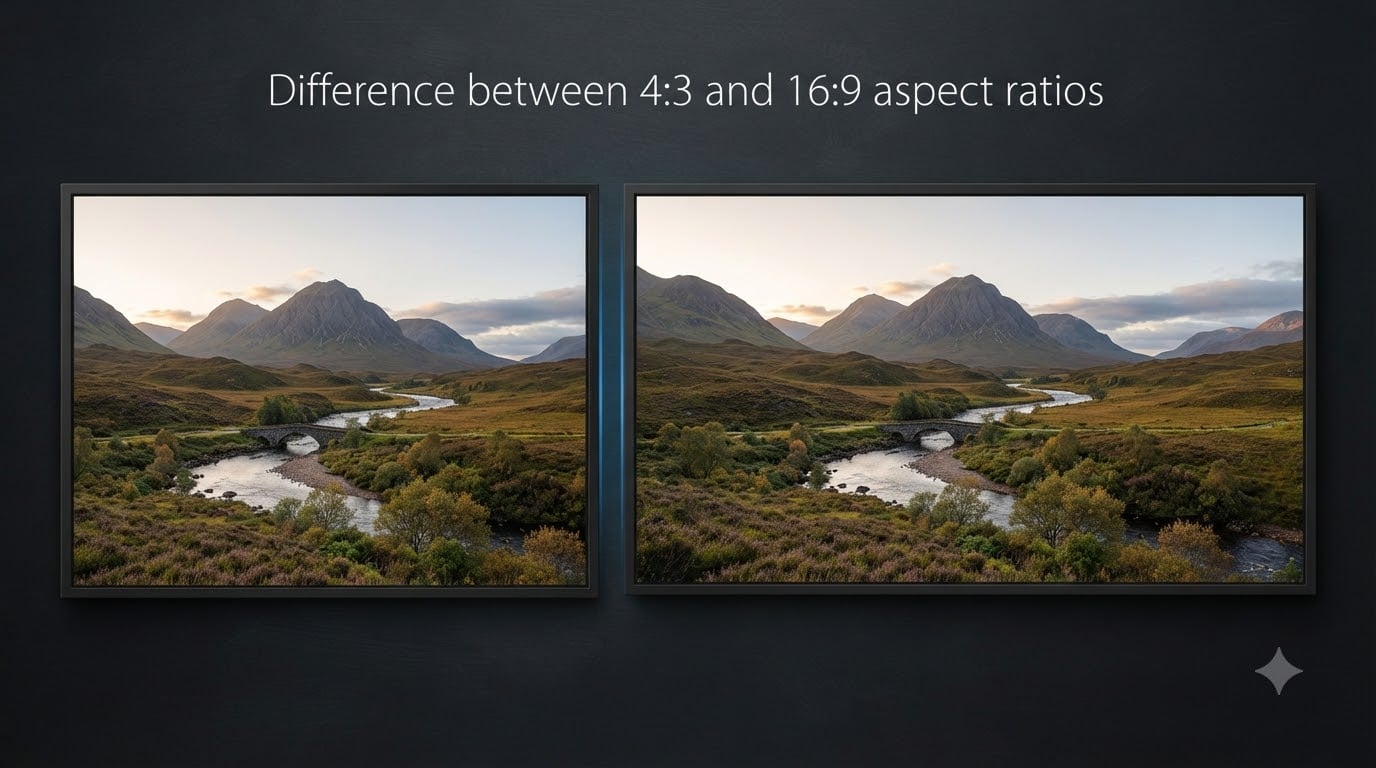
Have you ever noticed that old TVs look almost square while modern screens stretch wide and cinematic? That visual difference comes down to one thing: the difference between 4:3 and 16:9 aspect ratios. The 4:3 ratio produces a near-square frame that is 1.33 times wider than it is tall, while 16:9 creates a widescreen rectangle that is 1.78 times wider than its height.
Aspect ratio shapes everything about how you experience photos, videos, games, and even security footage. Choose the wrong one and you get black bars, cropped heads, or missing content on the edges of your frame. Our team has spent years working with both formats across photography, video production, and display calibration, and I can tell you that understanding this single concept eliminates a surprising amount of frustration.
In this guide, I break down exactly what each ratio means, how they differ visually and mathematically, why the world switched from 4:3 to 16:9, and which ratio you should pick for specific situations in 2026.
Table of Contents
What Is an Aspect Ratio?
An aspect ratio is simply the proportional relationship between the width and height of a screen or image. It is written as two numbers separated by a colon, like 4:3 or 16:9. The first number represents width and the second represents height.
Think of it as a recipe for shape. A 4:3 ratio means for every 4 units of width, you get 3 units of height. A 16:9 ratio means for every 16 units of width, you get 9 units of height. The actual size can be anything, from a phone screen to a movie theater wall, because the ratio only describes proportion, not physical dimensions.
One common point of confusion, which I see constantly in photography and video forums, is mixing up aspect ratio with resolution. Aspect ratio defines the shape of your frame. Resolution defines how many pixels fill that shape. A 16:9 frame could be 1280×720, 1920×1080, or 3840×2160, and they all share the same shape but contain very different amounts of detail.
What Is the 4:3 Aspect Ratio?
The 4:3 aspect ratio, also expressed mathematically as 1.33:1, produces a frame that is almost square. For every 4 units of width, the height measures 3 units. This creates a boxy, slightly wider-than-tall shape that dominated visual media for most of the 20th century.
Visually, a 4:3 frame captures more vertical space relative to its width than 16:9 does. That means you see more of the top and bottom of a scene. This matters enormously for security cameras, portrait photography, and any content where vertical detail like faces, full-body shots, or tall objects takes priority.
The 4:3 ratio was the standard for analog television broadcasts from the 1940s through the early 2000s. It was also the native format for early computer monitors, with classic resolutions like 640×480 (VGA) and 1024×768 (XGA). The format traces its roots back to the early days of cinema, where it became known as the Academy ratio around 1932.
Common 4:3 resolutions include 640×480, 800×600, 1024×768, and 1600×1200. Even today, many digital camera sensors, particularly Micro Four Thirds systems, natively shoot in a 4:3 format because the sensor itself has that proportional shape.
What Is the 16:9 Aspect Ratio?
The 16:9 aspect ratio, expressed mathematically as 1.78:1, produces a widescreen rectangle that is noticeably wider and shorter than 4:3. For every 16 units of width, the height measures 9 units. This creates that familiar cinematic, panoramic shape you see on virtually every modern TV, laptop, and phone in landscape mode.
Compared to 4:3, a 16:9 frame captures significantly more horizontal space. You see more of the left and right of a scene, which makes it ideal for landscape photography, sweeping vistas, and any content where width matters more than height. The widescreen format creates a more immersive viewing experience because it matches the natural field of human vision more closely.
The 16:9 ratio became the international standard for high-definition television through a compromise worked out in the early 1990s by Dr. Kerns H. Powers at SMPTE. The brilliant part of this decision was that 16:9 sits as a mathematical middle ground between old 4:3 TV and various widescreen cinema formats, minimizing wasted screen space no matter what you watched.
Common 16:9 resolutions include 1280×720 (HD), 1920×1080 (Full HD), 2560×1440 (QHD), and 3840×2160 (4K UHD). Every YouTube video, Netflix stream, and modern broadcast uses this ratio as its default delivery format in 2026.
4:3 vs 16:9: Key Differences Explained
The difference between 4:3 and 16:9 aspect ratios comes down to shape, field of view, and how content behaves when played across different screens. Let me walk through the specifics.
Shape: 4:3 looks nearly square with a 1.33:1 proportion. 16:9 looks like a wide rectangle at 1.78:1. The 16:9 frame is about 33 percent wider relative to its height than 4:3.
What each captures: 4:3 gives you more vertical real estate, showing more of the top and bottom of any scene. 16:9 gives you more horizontal real estate, showing more of the sides. Neither captures more total area, they just distribute the same view differently.
Black bars and letterboxing: When you play 4:3 content on a 16:9 screen, you get black bars on the left and right sides, which is called pillarboxing. When you play 16:9 content on a 4:3 screen, you get black bars on the top and bottom, which is called letterboxing. This is the most common frustration I hear from users in forums.
Content stretching: Some devices let you force-fill a 4:3 image across a 16:9 screen by stretching it horizontally. This makes people look wider and circles look like ovals. I strongly recommend avoiding this unless you enjoy everyone looking like they gained thirty pounds.
Immersive feel: 16:9 creates a more immersive, cinematic experience because it fills more of your peripheral vision horizontally. This is why theaters and living room TVs went widescreen, it simply feels more engaging for narrative content.
Practical capture: For anything vertical, like standing people, tall buildings, or documents, 4:3 wastes less frame space. For anything horizontal, like landscapes, group shots side by side, or panoramic scenes, 16:9 uses the frame more efficiently.
Why Did We Switch From 4:3 to 16:9?
The transition from 4:3 to 16:9 happened because the entertainment industry wanted to bring the cinematic experience into living rooms. For decades, movies were filmed in widescreen formats like 2.35:1 while home TVs remained stuck at 4:3. This mismatch meant that when a movie aired on television, huge chunks of the image got cropped or the screen got covered in black bars.
In the late 1980s and early 1990s, the television industry recognized that home viewing needed to catch up. Dr. Kerns H. Powers proposed 16:9 as a compromise ratio because it minimized the unused screen area when displaying both old 4:3 content and various widescreen cinema formats. It was not chosen arbitrarily, it was calculated to be the most efficient middle ground.
The shift accelerated in the late 1990s and 2000s as HDTV standards were formalized. The Advanced Television Systems Committee, or ATSC, adopted 16:9 as the native aspect ratio for digital broadcasting. Manufacturers began producing widescreen TVs, broadcasters began upgrading their equipment, and by the early 2010s, 4:3 television production had largely ended in most markets.
Computer monitors followed a parallel path. Early PCs used 4:3 screens because they shared manufacturing with televisions. As LCD technology matured and media consumption shifted to computers, manufacturers transitioned monitors to 16:9 as well, creating a unified widescreen standard across nearly all devices.
When to Use 4:3 vs 16:9
Choosing the right aspect ratio depends entirely on what you are creating and where it will be displayed. Here is how I break down the decision across common scenarios.
Photography: Many photographers prefer 4:3 for portraits, macro shots, and product photography because it captures more vertical detail. You get more of a person’s full body, more of a tall flower, or more of a vertical product without cropping. For landscapes and architectural shots, 16:9 creates that sweeping, wide feeling that draws viewers in.
Video and YouTube: 16:9 is the absolute standard for video in 2026. YouTube, Vimeo, Netflix, and nearly every streaming platform expects 16:9 content. If you shoot in 4:3, the platform will add pillarbox bars or your viewers will see a smaller image floating in the middle of their screen. Shoot 16:9 unless you have a specific creative reason not to.
Gaming: Most modern games target 16:9 as the default, giving you a wider field of view for immersive play. However, competitive players in games like Counter-Strike have historically preferred 4:3 stretched mode because it makes character models appear wider and theoretically easier to hit. This is a niche strategy, not a general recommendation.
Security cameras: I consistently see security professionals recommend 4:3 for surveillance. The extra vertical capture area means cameras record more of doorways, faces, and license plates. A 16:9 security camera often cuts off the top of a person’s head or the bottom of a vehicle plate, exactly the details you need.
Social media: This is where things get complicated. Instagram feed posts work well at 4:5 (portrait) or 1:1 (square). Instagram Stories and TikTok demand 9:16 vertical. YouTube thumbnails and Facebook cover photos use 16:9. The key insight from content creators is to always shoot in the highest resolution possible and crop to each platform’s preferred ratio afterward.
Presentations and documents: Older PowerPoint templates used 4:3, but modern presentations default to 16:9 to match current projectors and displays. If you are creating slides in 2026, use 16:9 unless you know the presentation will display on legacy equipment.
Resolution vs Aspect Ratio: Understanding the Difference
This is the single most common confusion I encounter, and clearing it up makes everything else about aspect ratios click into place.
Aspect ratio describes shape. Resolution describes detail. They are independent properties that work together. A 16:9 video at 1920×1080 and a 16:9 video at 3840×2160 have the exact same shape but very different levels of sharpness and clarity.
Think of it like a container. The aspect ratio determines whether your container is a square box or a wide tray. The resolution determines how tightly packed the contents are. You can have a high-resolution square or a low-resolution rectangle.
This matters because people sometimes assume that switching to a higher resolution will fix aspect ratio problems. It will not. Playing a 4:3 video at 4K resolution on a 16:9 screen still produces pillarbox bars. The shape mismatch remains regardless of how many pixels you throw at it.
How to Change Aspect Ratio Settings
Most modern devices let you switch between aspect ratios, but the process varies. Here are the practical steps for common scenarios.
On iPhone: Open the Camera app, tap the arrow at the top of the screen, and select the ratio icon. You can choose between 4:3 (the default for photos), 1:1 square, and 16:9. The iPhone’s sensor natively captures 4:3, so shooting at 16:9 actually crops pixels from the top and bottom of the image.
On Android: The steps vary by manufacturer, but generally you open the Camera app, tap the settings gear or aspect ratio icon, and select your preferred ratio. Samsung and Google Pixel phones offer similar options to iPhone, typically including 4:3, 1:1, and 16:9.
In video editing software: Programs like Adobe Premiere Pro, DaVinci Resolve, and Final Cut Pro let you set your project aspect ratio and resolution when creating a new sequence. You can also change the aspect ratio of individual clips by cropping or scaling, though this may cut off content or reduce quality.
Before you convert: I always recommend shooting in the native aspect ratio of your camera sensor, which is usually 4:3 for phones and Micro Four Thirds cameras, or 3:2 for most DSLRs. This captures the maximum amount of image data. You can always crop to 16:9 or any other ratio in post-production without losing quality, but you cannot recover cropped pixels if you shot in the wrong ratio from the start.
FAQs
Is 16:9 aspect ratio better than 4:3?
Neither ratio is inherently better. 16:9 is better for watching movies, YouTube videos, and modern TV content because it matches the widescreen standard. 4:3 is better for security cameras, portrait photography, and capturing vertical detail. The better choice depends entirely on your use case.
Is it better to take 4:3 photos or 16:9?
For most photography, shoot in your camera’s native ratio, which is usually 4:3 on phones and Micro Four Thirds cameras. This captures the maximum pixel data. You can always crop to 16:9 later for landscapes or social media. Shooting 16:9 in-camera throws away pixels you can never get back.
What is the difference between 4:3 and 16:9 aspect ratios?
The 4:3 aspect ratio has a proportional width to height of 1.33:1, creating a nearly square shape. The 16:9 ratio has a proportional width to height of 1.78:1, creating a widescreen rectangle. 4:3 captures more vertical detail while 16:9 captures more horizontal width.
Why did we switch from 4:3 to 16:9?
The switch happened because the television and film industries wanted to bring the cinematic widescreen experience into homes. Movies were filmed in widescreen formats while home TVs were stuck at 4:3, causing awkward cropping. The 16:9 ratio was chosen in the 1990s as a mathematical compromise that worked reasonably well for both old TV content and widescreen movies.
Conclusion
The difference between 4:3 and 16:9 aspect ratios comes down to shape and purpose. The 4:3 ratio at 1.33:1 gives you a near-square frame that excels at vertical detail, making it the go-to for security cameras, portrait photography, and legacy content. The 16:9 ratio at 1.78:1 delivers that widescreen cinematic experience that has become the universal standard for TV, streaming, and gaming in 2026.
My recommendation is simple: shoot in your camera’s native ratio to capture maximum pixels, plan your final delivery format before you hit record, and never stretch content to force-fill a mismatched screen. Get the ratio right from the start and everything downstream, from editing to publishing to viewing, falls into place.